PARROT INTERACTIVE SOLUTIONS

Interactive Touch QLED.
Built for Better Collaboration.

Bring presentations, lessons and collaborative work to life with professional 4K interactive touch displays designed for boardrooms, classrooms, training rooms and modern shared spaces.

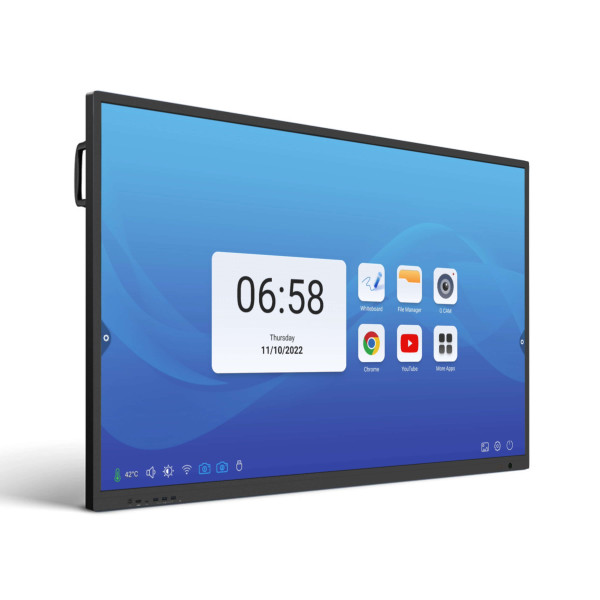
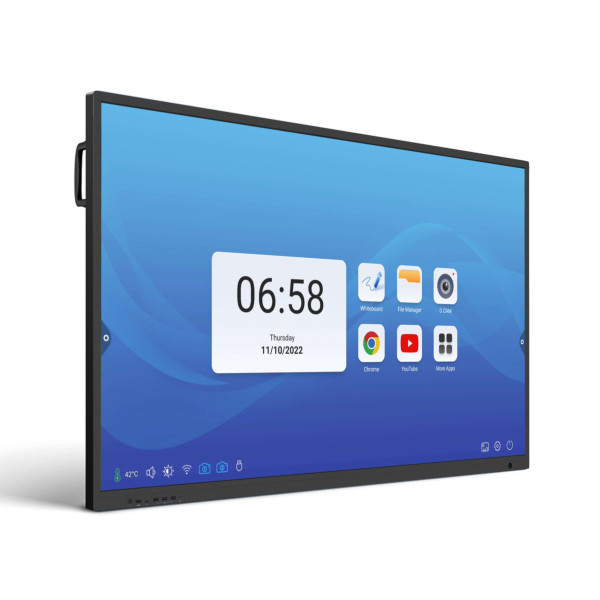
PARROT Interactive Touch QLED 65 inch 4K display
4K QLED Multi-Touch Wireless Casting Google EDLA
4K QLED High-detail visual clarity
20-Point Touch Android interaction
50-Point Touch Windows interaction
Wireless Casting Share without cables
Software Included Collaborate from day one
THE INTERACTIVE QLED RANGE

Choose the screen that fits your space

Three premium interactive display sizes designed to bring presentation, teaching and collaboration together on one screen.

IP0065B
Interactive Touch QLED 65"
Premium Collaborative Display

A professional 65-inch interactive display for boardrooms, smaller classrooms, meeting rooms and collaborative spaces.

  • 65-inch 4K QLED display
  • 20-point touch on Android
  • 50-point touch on Windows
  • Wireless content sharing
  • Digital whiteboard tools
  • Google EDLA certified
Buy Now
IP0075B
Interactive Touch QLED 75"
Large-Format Education & Training Display

A balanced large-format interactive screen for classrooms, training facilities, meeting rooms and collaborative environments.

  • 75-inch 4K QLED display
  • 20-point touch on Android
  • 50-point touch on Windows
  • Wireless screen sharing
  • Interactive annotation tools
  • Google EDLA certified
Buy Now
IP0086B
Interactive Touch QLED 86"
Premium Large-Room Presentation Display

An expansive interactive display built for executive boardrooms, larger classrooms, conference rooms and high-impact presentations.

  • 86-inch 4K QLED display
  • 20-point touch on Android
  • 50-point touch on Windows
  • Wireless presentation tools
  • Large-format collaboration
  • Google EDLA certified
Buy Now
SOFTWARE INCLUDED

More than the screen. Powerful collaboration tools are included.

The PARROT Interactive Touch QLED range combines premium display hardware with software designed to support presenting, teaching, collaboration and device management.

01
Free Casting Software

Share compatible device screens wirelessly for smoother presentations and collaborative sessions.

02
Free Whiteboard Software

Write, draw, explain and annotate directly on screen during lessons, meetings and workshops.

03
Free Device Management

Support the ongoing management of interactive displays across classrooms, offices and shared environments.

04
Free Online Training

Online training and certification help users understand and get more value from the interactive technology.

Compare the complete interactive solution — not only the screen.

When comparing interactive touch panels, consider whether wireless casting, digital whiteboarding, device management and user training are included or require additional software, licensing or setup.

TECHNOLOGY BUILT FOR COLLABORATION

One screen. Multiple ways to work.

Move beyond passive presentations with interactive technology designed for participation, explanation and shared ideas.

01 / WIRELESS
Present Wirelessly

Share compatible laptops, tablets and mobile devices without constantly changing presentation cables.

02 / INTERACTIVE
Write & Annotate

Use the display as a digital workspace for explanations, lessons, brainstorming and live annotation.

03 / MULTI-TOUCH
Collaborate Together

Multi-touch interaction allows more than one participant to work with on-screen content at the same time.

04 / MANAGEMENT
Manage Smarter

Integrated tools support more efficient management and everyday use across modern organisations.

SEE THE TECHNOLOGY

Experience interactive collaboration in action

See how wireless casting, digital whiteboarding, multi-touch interaction and collaborative tools can change the way people present, teach and work together.

Book a Free Demo
BUILT AROUND THE ROOM

Built for the room. Ready for the people.

Interactive display requirements change with the space, audience and way people need to present, teach and collaborate.

Corporate
Boardrooms & Meeting Rooms

Present wirelessly, annotate ideas, share content and collaborate visually in boardrooms, meeting spaces and executive presentation environments.

Education
Classrooms & Learning Spaces

Bring digital teaching, whiteboarding, multimedia and learner participation together on one large interactive display.

Training
Training & Workshop Spaces

Run workshops, presentations and collaborative training sessions with interactive content visible to the whole room.

Flexible Spaces
Mobile Interactive Setups

Add mobility where a display needs to move between classrooms, meeting rooms or shared presentation areas.

View the IW7102 Mobile Stand →
65" VS 75" VS 86"

Which interactive touch screen should you choose?

Screen size should match the room, viewing distance, audience and type of interaction required.

Screen Model Best suited to Typical environments Product
65 inch IP0065B Smaller to medium spaces Boardrooms, huddle rooms, smaller classrooms View IP0065B 65"
75 inch IP0075B Balanced large-format viewing Classrooms, training rooms, meeting spaces View IP0075B 75"
86 inch IP0086B Large rooms and audiences Conference rooms, executive boardrooms, large classrooms View IP0086B 86"
COMPLETE THE SETUP

Complete your interactive setup

Take your interactive solution beyond the wall with mobile support options for classrooms, training facilities and shared spaces.

IW7102
Interactive Touch Panel Mobile Stand

A mobile support solution for large interactive touch panels where permanent wall mounting is not the preferred option.

View IW7102
IW2051
Interactive Whiteboard Stand on Castors

A practical mobile stand for compatible PARROT interactive whiteboards in classrooms, training rooms and shared presentation spaces.

View IW2051
SEE IT BEFORE YOU CHOOSE

Book a free interactive panel demonstration

See the technology in action before deciding which screen size is right for your room. MCS Office National can assist with interactive display selection based on room size, viewing needs, intended use and mounting requirements.

INTERACTIVE QLED GUIDE

Common questions about interactive touch screens

What is an interactive QLED touch screen?

An interactive QLED touch screen combines a large digital display with multi-touch interaction, digital whiteboarding and presentation tools so users can work directly on screen.

Can an interactive touch screen be used in a boardroom?

Yes. Interactive touch displays can support presentations, wireless screen sharing, annotation, meetings and collaborative work in boardrooms and meeting rooms.

Are interactive displays suitable for classrooms?

Yes. Interactive displays can support digital lessons, multimedia teaching, whiteboarding, annotation and collaborative classroom activities.

What software is included with PARROT Interactive Touch QLED displays?

The range includes software for wireless casting, digital whiteboarding and device management, together with online training and certification resources.

Should I choose a 65, 75 or 86 inch interactive display?

The best size depends on room dimensions, viewing distance, audience size and intended use. Smaller spaces may suit a 65-inch display, while larger classrooms, boardrooms and presentation areas may benefit from 75-inch or 86-inch screens.

Can an interactive touch screen be mounted on a mobile stand?

Selected interactive displays can be paired with compatible mobile support solutions where mobility is preferred over a permanent wall-mounted installation. Always confirm compatibility before ordering.