-COLOURS-SLIM-CASE-BOX%20OF-10_1-40x40h.jpg "Reliable CD Media for Quality Storage and Playback")


-40x40.jpg "CD Envelopes – Paper Sleeves for CDs & DVDs")


-40x40.webp "Executive Office Chairs")






Delivery Timeframes
At MCS Office National, our standard delivery timeframe is 2 to 7 working days, depending on your location.
✓ Delivery times may vary based on your area and the products ordered.
✓ Some items may need to be specially ordered if they are not immediately available in stock.
✓ For urgent purchases or in-store collection, we recommend confirming stock beforehand.
Delivery Information
✓ Free delivery in selected local areas.
✓ Nationwide delivery across South Africa.
✓ Delivery fees are calculated automatically at checkout.
✓ Bulk, furniture and remote-area delivery quotes are available on request.
View our full delivery page for local delivery zones, minimum order requirements, courier details and nationwide shipping information.
View Full Delivery Information →- Brand: Parrot Products
- Model: IP0065B
- Ean: 6009715962249
- Categories:
- - Interactive Systems
Available Options
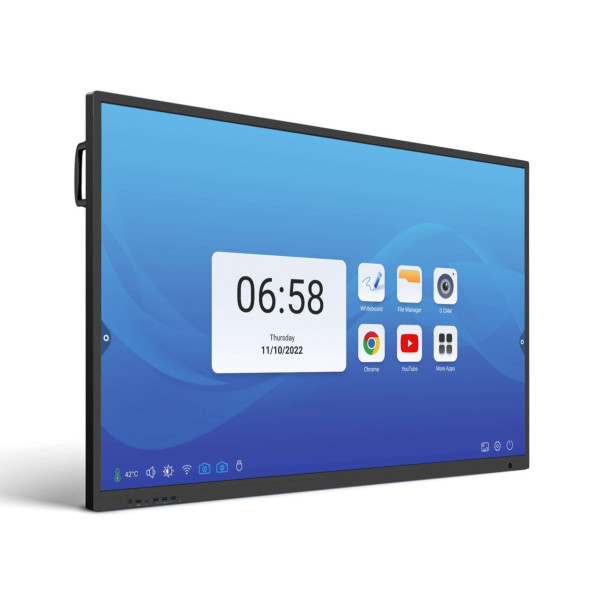
Smart 65-inch 4K interactive touch panel for teaching, presenting, digital whiteboarding and wireless collaboration.
- ✓ 4K QLED Display
- ✓ Google EDLA Certified
- ✓ Wireless Presenting
- ✓ Classroom & Boardroom Ready
- ✓ Free Demo Available
- ✓ 5-year limited warranty
- Description
- Ways to Pay
- Reviews
- BOOK A FREE DEMO
- Q & A
- Specifications
- Installation & Support
- Size Guide
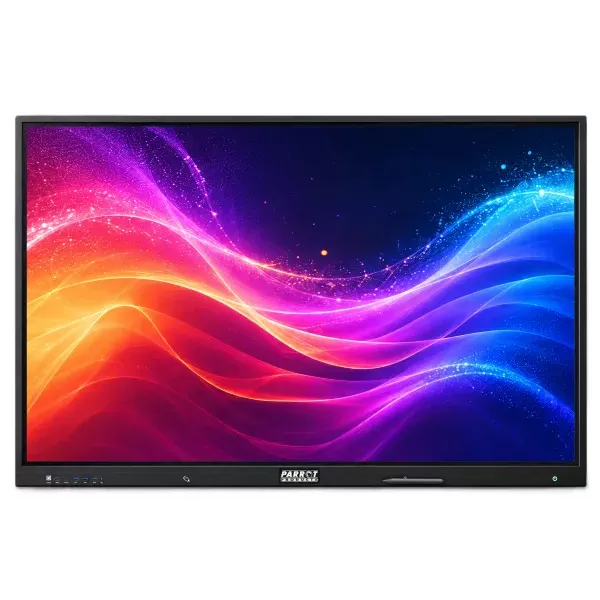
The PARROT 65-Inch 4K Interactive QLED Touch Panel is a professional interactive display designed for modern classrooms, boardrooms, training rooms, public-sector spaces and collaborative work environments. It combines a 65-inch 4K QLED screen, responsive multi-touch interaction, wireless screen sharing, digital whiteboarding and smart Android performance in one complete presentation solution.
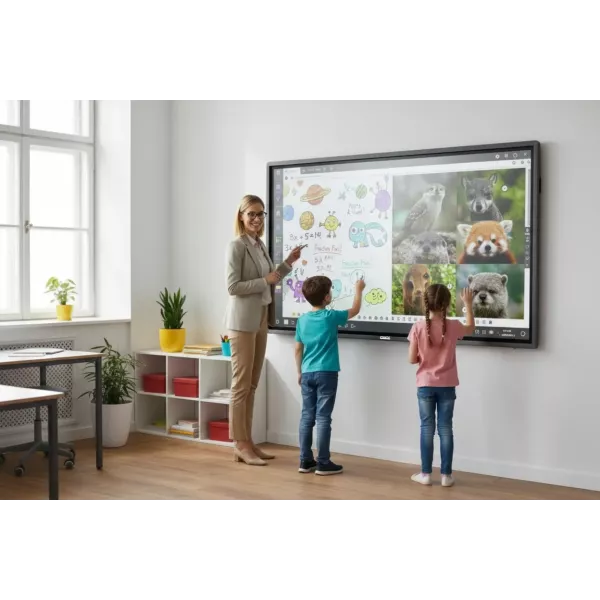
Built to help users connect, collaborate and create, this interactive touch panel gives teachers, presenters and teams a more practical way to explain ideas, share content, annotate documents, run lessons, manage presentations and work together on screen. It is ideal for schools, colleges, businesses, churches, training centres and meeting spaces where a normal display or projector no longer provides enough interaction.
- ✓ 65-inch 4K UHD QLED interactive display for clear, professional visuals
- ✓ Android 13 with Google EDLA certification and Google Mobile Services access
- ✓ RK3588 octa-core CPU with 8GB RAM and 128GB storage
- ✓ IR touch technology with pen and finger input
- ✓ 20 touch points on Android and 50 touch points on Windows
- ✓ Wireless casting via AirPlay, Miracast, DLNA and Chromecast
- ✓ eShare interactive software for casting, wireless display and remote control
- ✓ Built-in whiteboard, annotation tools, floating menu and AI tools
- ✓ Centralised device management for remote control, updates, scheduling and monitoring
- ✓ Wi-Fi 6, Bluetooth 5.2, built-in speakers and OPS support
The display delivers sharp 3840 x 2160 4K UHD resolution with True QLED colour, 93% NTSC colour gamut, 1.07 billion colours, 4mm anti-glare glass, optical bonding, low blue light support and wide 178° viewing angles. This makes content easier to see during lessons, meetings, training sessions and presentations.
The 65-inch screen size is well suited to smaller classrooms, huddle rooms, compact boardrooms and training spaces where viewers are seated reasonably close to the display. For larger rooms or bigger audiences, the 75-inch or 86-inch PARROT interactive QLED panel options may be more suitable.
Included accessories are a wall bracket, HDMI cable, USB touch cable, power cable and 2 stylus pens. The product is backed by Parrot’s 5-year limited warranty on the interactive touch LED panel, with supplied accessories covered for 1 year according to Parrot’s warranty terms and conditions.
For schools, businesses and organisations that require support with size selection, setup planning or a product demonstration, MCS Office National can assist with practical guidance and quotation support. Installation assistance, accessories and onsite requirements may be quoted separately depending on the site and project needs.
 Secure Online Payment




Peach Payments Secure Checkout
Our preferred secure online payment option. Pay by card, Pay by Bank or MobiCred.
 Secure Online Payment




Payfast Secure Checkout
Pay securely using card, Apple Pay, Google Pay, Samsung Pay or Zapper.
30 Day Account Customers
Approved business account customers can use their 30 Day Account facility during checkout.
Request a Quotation
Need approval first? Request a formal quotation during checkout before placing your order.
Book a Free Interactive Panel Demonstration
Choosing an interactive touch panel is easier when you can see how it works in a real classroom, boardroom or training environment. MCS Office National can assist schools, businesses and organisations with a free demonstration or consultation for the PARROT interactive panel range.
During the demonstration or consultation, our team can help you understand the screen size options, wireless screen sharing, digital whiteboarding, annotation tools, classroom use, boardroom use and setup requirements.
- ✓ See how the interactive panel works before you buy
- ✓ Compare 65-inch, 75-inch and 86-inch screen options
- ✓ Discuss classroom, boardroom or training-room requirements
- ✓ Get guidance on wall mounting, mobile stands and accessories
- ✓ Ideal for schools, colleges, businesses, churches and training centres
To request a free demonstration, use the contact form and select Book a Free Demonstration as the topic. Our team will help arrange the next step.
PARROT 65-Inch 4K Interactive QLED Touch Panel – Q&A
Q: What is the PARROT 65-Inch 4K Interactive QLED Touch Panel used for?
A: It is used for interactive teaching, presentations, digital whiteboarding, wireless screen sharing, training sessions, meetings and collaborative work in classrooms, boardrooms and training rooms.
Q: Is this panel suitable for schools?
A: Yes. It is ideal for classrooms and learning environments where teachers need to present lessons, write on screen, annotate content and encourage learner participation.
Q: Can it be used in a boardroom?
A: Yes. The panel is suitable for smaller boardrooms, huddle rooms and meeting spaces where teams need to present, collaborate, share screens and work through ideas visually.
Q: Does the panel support wireless screen sharing?
A: Yes. It supports wireless casting through AirPlay, Miracast, DLNA and Chromecast from compatible devices.
Q: Does it support finger and stylus input?
A: Yes. The panel supports both finger and stylus input for writing, drawing, annotation and touch navigation.
Q: How many touch points does it support?
A: It supports 20 touch points on Android and 50 touch points on Windows.
Q: What operating system does it use?
A: It runs on Android 13 and includes Google EDLA certification.
Q: What does EDLA certification mean?
A: EDLA certification gives users access to a more complete Android and Google app-based experience on the panel.
Q: Is the 65-inch size big enough for a classroom?
A: The 65-inch size is suitable for smaller classrooms and rooms where viewers are seated relatively close to the screen. For larger classrooms or halls, a 75-inch or 86-inch panel may be more suitable.
Q: Can I book a free demonstration?
A: Yes. Use the contact form and select Book a Free Demonstration as the topic. MCS Office National can assist qualifying schools, businesses and organisations with a demonstration or consultation.
Q: Is installation included?
A: Installation requirements can vary depending on the site, wall type, room layout and accessories required. Contact MCS Office National for installation guidance or a quotation.
Q: What warranty and support are included?
A: The product includes a 5-year limited warranty on the interactive touch LED panel, with supplied accessories covered for 1 year according to Parrot warranty terms. Free online training via Parrot Academy and lifetime remote support are available through the Parrot support ecosystem.
Q: Can this replace a projector?
A: In many classrooms and boardrooms, yes. An interactive touch panel offers a bright 4K display, touch interaction, digital whiteboarding and wireless sharing without the typical projector shadow and bulb-maintenance concerns.
PARROT 65-Inch Interactive QLED Touch Panel Specifications
The specifications below are based on the official Parrot QLED Interactive Screens spec sheet for the IP0065B, IP0075B and IP0086B range.
| Product Type | Interactive QLED Touch Panel |
| Brand | PARROT |
| Model | IP0065B |
| Screen Size | 65 inch |
| Available Range | 65 inch, 75 inch and 86 inch 4K QLED interactive panels |
| Resolution | 3840 x 2160 4K UHD |
| Display Technology | True 4K QLED |
| Backlight | D-LED |
| Display Ratio | 16:9 |
| Display Area | 1428 x 803 mm |
| Colour Gamut | 93% NTSC |
| Display Colours | 1.07 billion colours |
| Glass | 4mm anti-glare glass |
| Bonding | Optical bonding |
| Low Blue Light | Supported |
| Brightness | 350 cd/m² typical |
| Contrast Ratio | 1200:1 / 4000:1 |
| Display Response Time | 8ms typical |
| Viewing Angle | 178° horizontal / 178° vertical typical |
| Display Lifetime | ≥ 30,000 hours |
| Touch Technology | IR touch |
| Surface Treatment | Anti-glare |
| Touch Accuracy | Φ 1mm |
| Touch Response Time | ≤ 3ms |
| Touch Points | 20 points on Android / 50 points on Windows |
| Touch Input | Stylus pen and finger input |
| System Support | Windows, Mac, Android, Linux and Chrome |
| Chipset | RK3588 |
| CPU | Octa-core CPU: 4 x A76 up to 2.4GHz and 4 x A55 up to 1.8GHz |
| RAM | 8GB |
| Storage | 128GB |
| Operating System | Android 13 |
| Google EDLA | Yes, with Google Mobile Services access |
| Wireless Casting | AirPlay, Miracast, DLNA and Chromecast |
| Wireless Casting Features | Touchback control, moderator mode and webcast support without app requirement |
| Device Management | Remote control, updates, app management, alarms, scheduling, real-time monitoring, batch workflows and sub-account control |
| Built-in Interactive Tools | Floating menu, eye protection mode, whiteboard with annotations, AI tools, power management and energy-saving modes |
| Wi-Fi | Wi-Fi 6, 802.11a/b/g/n/ac/ax |
| Bluetooth | Bluetooth 5.2 |
| Speaker | 15W x 2 |
| Hotspot | Supported |
| Rear I/O | Includes RS232, COAX/SPDIF, RJ45, USB 3.0, line out, VGA, audio in, touch USB, Type-C, HDMI, HDMI out, DP in, mic in, TF card and OPS slot connections |
| OPS Support | Supports standard OPS modules for Windows PC integration |
| Working Voltage | AC100 - 240V |
| Power Consumption | ≤ 250W full load |
| Standby Power Consumption | < 0.5W |
| Operating Temperature | 0°C to 55°C, 20% to 80% RH |
| Storage Temperature | -10°C to 55°C, 20% to 90% RH |
| Installation Method | Wall hanging or stand |
| Overall Dimensions | 1487.3 x 903.9 x 116 mm |
| Package Size | 1580 x 1000 x 200 mm |
| Net Weight | 35 ± 1 kg |
| Gross Weight | 44 ± 1 kg |
| Included Accessories | Wall bracket, HDMI cable, USB touch cable, power cable and 2 stylus pens |
| Certifications | NRCS and ICASA certified |
| Warranty | 5-year limited warranty on the Interactive Touch LED panel, subject to Parrot warranty terms and conditions |
| Supplied Accessories Warranty | 1 year according to Parrot warranty terms |
| Support | Free online training via Parrot Academy and lifetime remote support |
Installation & Support
An interactive touch panel is more than just a display. To get the best experience, the panel should be matched to the room size, mounting position, connection requirements and the way your school, business or organisation plans to use it.
MCS Office National can assist with product guidance, screen-size selection, demonstration requests and practical setup advice. Where required, installation assistance, mounting options and related accessories can be discussed and quoted separately based on the site and project requirements.
- ✓ Guidance on choosing the correct interactive panel size
- ✓ Advice for classroom, boardroom and training-room setups
- ✓ Wall-mount and mobile-stand options can be discussed
- ✓ Accessory recommendations such as OPS PC, webcam, soundbar or cabling where required
- ✓ Setup guidance for wireless presenting and everyday panel use
- ✓ Online training and remote support options available through the Parrot support ecosystem
For larger school projects, boardroom upgrades or training-room installations, we recommend requesting a consultation before purchase. This allows the screen size, mounting position, power access, accessories and setup requirements to be reviewed before finalising the order.
Please note: Installation, site work, additional cabling, accessories and onsite setup may not be included in the standard product price and can be quoted separately where required.
Which Interactive Panel Size Should I Choose?
The correct screen size depends on the room size, seating distance, number of viewers and how the panel will be used. The PARROT interactive QLED range includes 65-inch, 75-inch and 86-inch options.
| Size | Best For | Recommended Use |
|---|---|---|
| 65 inch | Smaller classrooms, huddle rooms and compact boardrooms | Best where viewers are seated relatively close to the screen |
| 75 inch | Standard classrooms, meeting rooms and training spaces | A balanced option for visibility and room size |
| 86 inch | Larger classrooms, conference rooms and presentation areas | Best for bigger rooms or larger audiences |
If you are unsure which size is right for your space, book a free demonstration or contact MCS Office National for practical advice before ordering.